iDARMS Website — Core Pages Acceptance Tests
Test series: WEB-01 to WEB-07, WEB-23
Objective: Validate each primary public route against the approved full-page desktop layout baseline, including hero hierarchy, section bands, and brand chrome.
Execution ownership
Recommended owners: Communications/web content owner; UX/visual reviewer
Prerequisites: Approved website build/URL; desktop Chrome at 1440×900, device scale 1.
Execution control
Attach one full-page cycle screenshot per route (*_desktop-full.webp under docs/assets/Website/page-load/). Do not embed section crops, first-paint, or content-ready images in this module. Chrome/interaction and Lighthouse proofs live in their own modules. Hide the Next.js floating N badge before capture (devIndicators: false in the website next.config, then restart npm run dev). Store proofs as .webp.
Feature overview
The Core Pages module covers the primary public menu routes plus the footer Services gateway:
- Home (
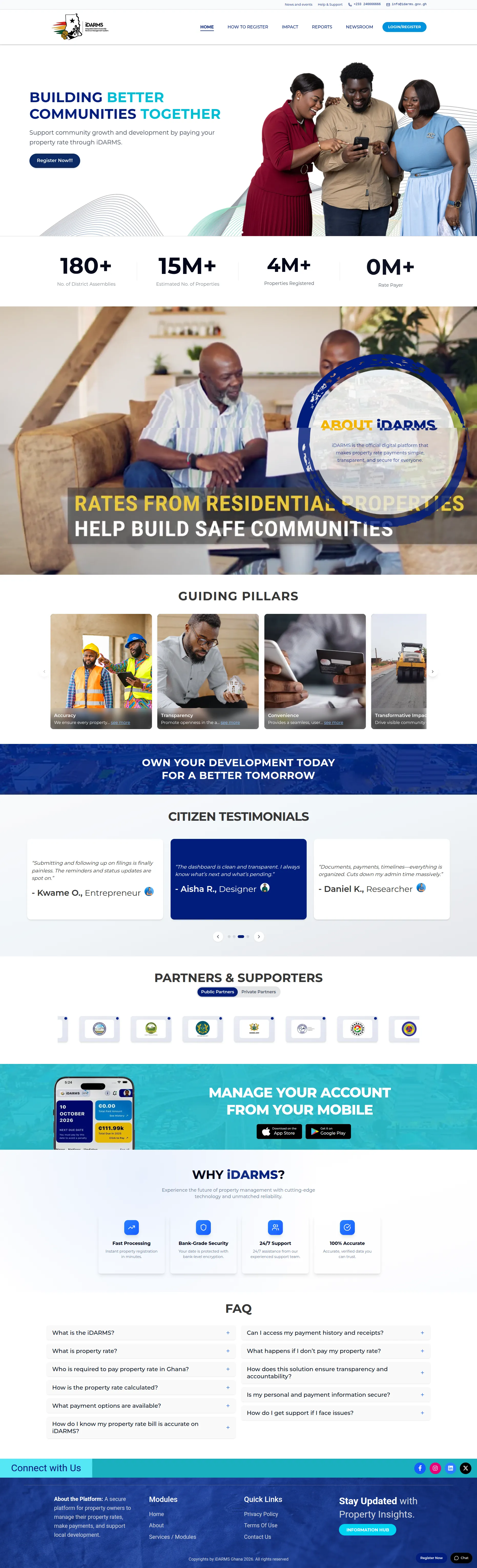
/) — dual header, hero with cyan keyword highlights, stats, about band, key values, pillars, testimonials, partners, teal app band, value proposition, FAQ, and navy footer. - How to Register (
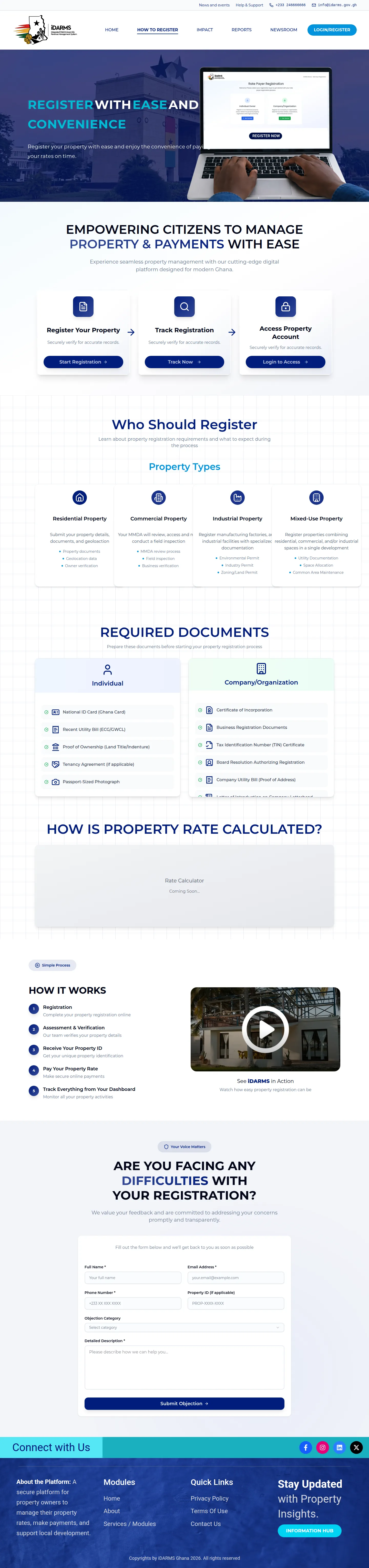
/HowtoRegister) — registration guidance cards, document/calculator sections, objection form card, and portal handoff via Start Registration. - Impact (
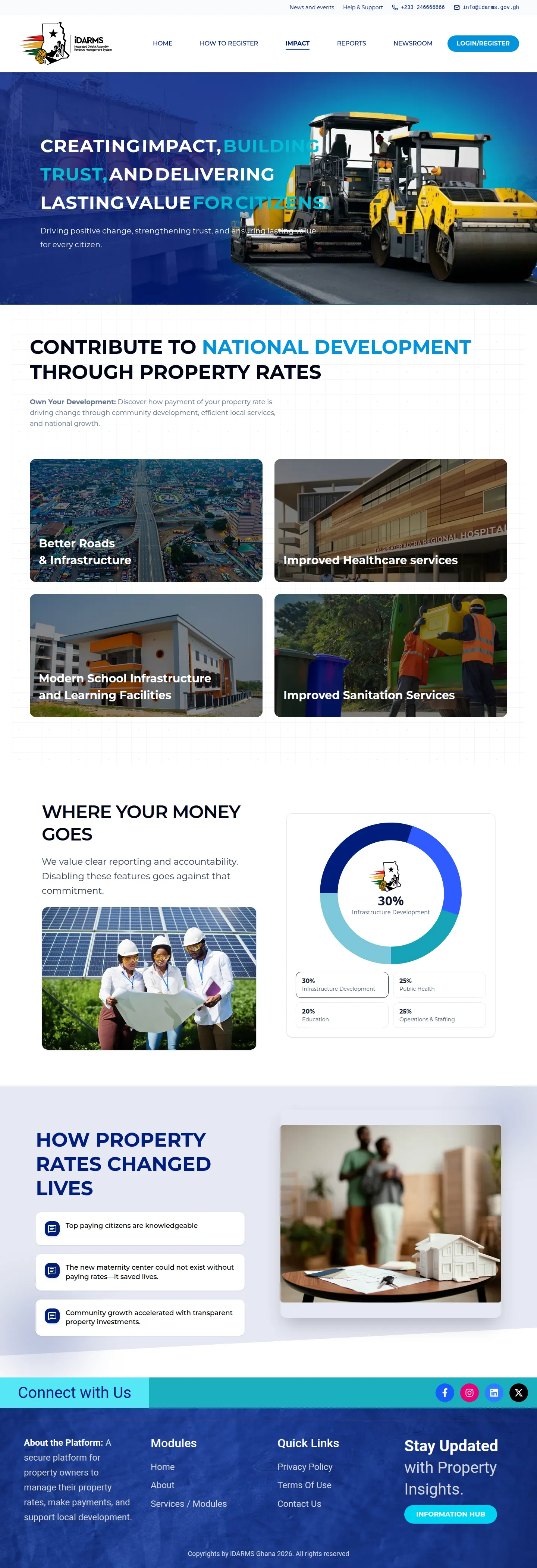
/Impact) — construction hero, contribution narrative, and “Where your money goes” donut with legend cards. - Reports (
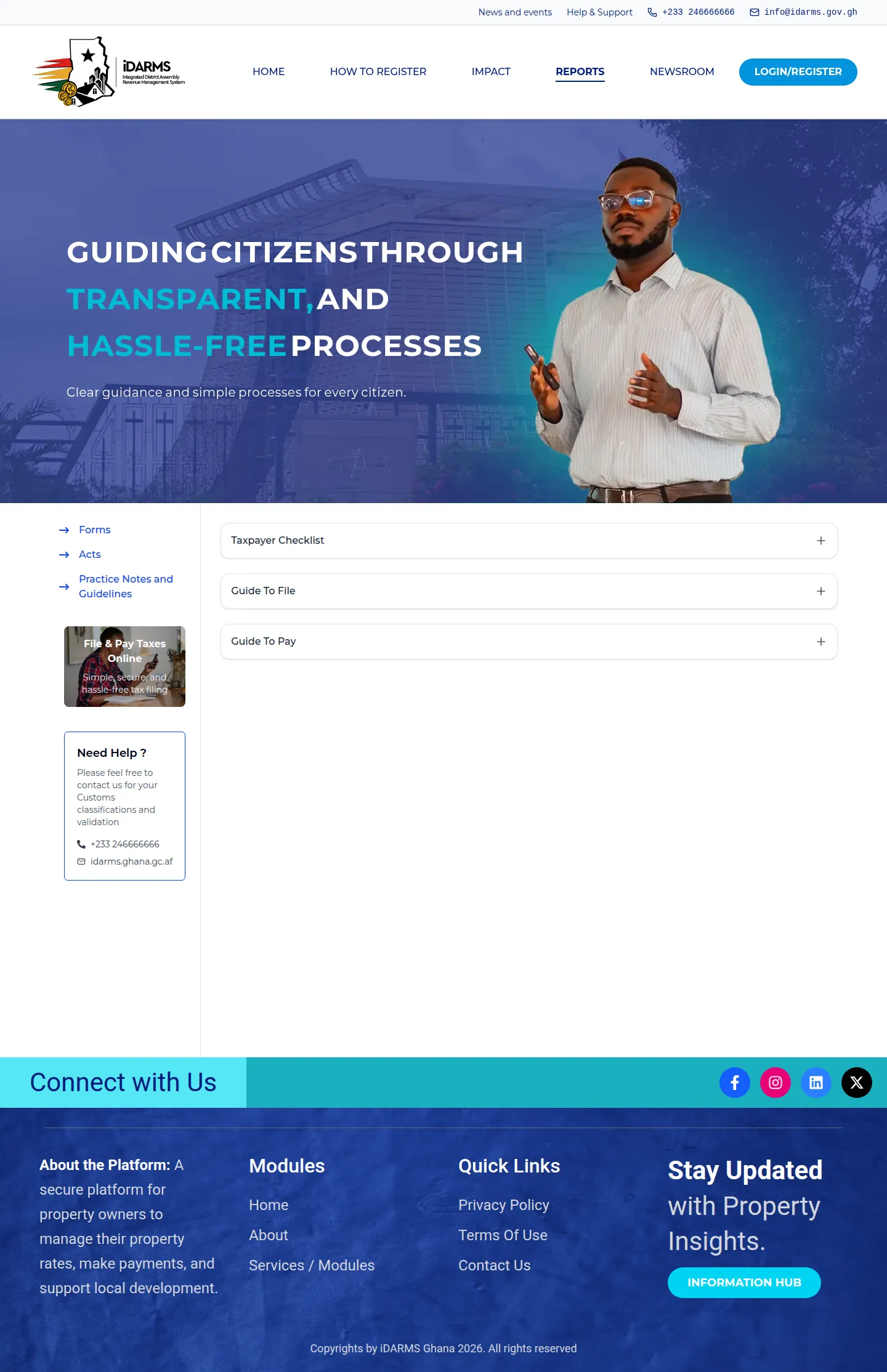
/Reports) — two-column layout with sidebar links and accordion document list. - Newsroom (
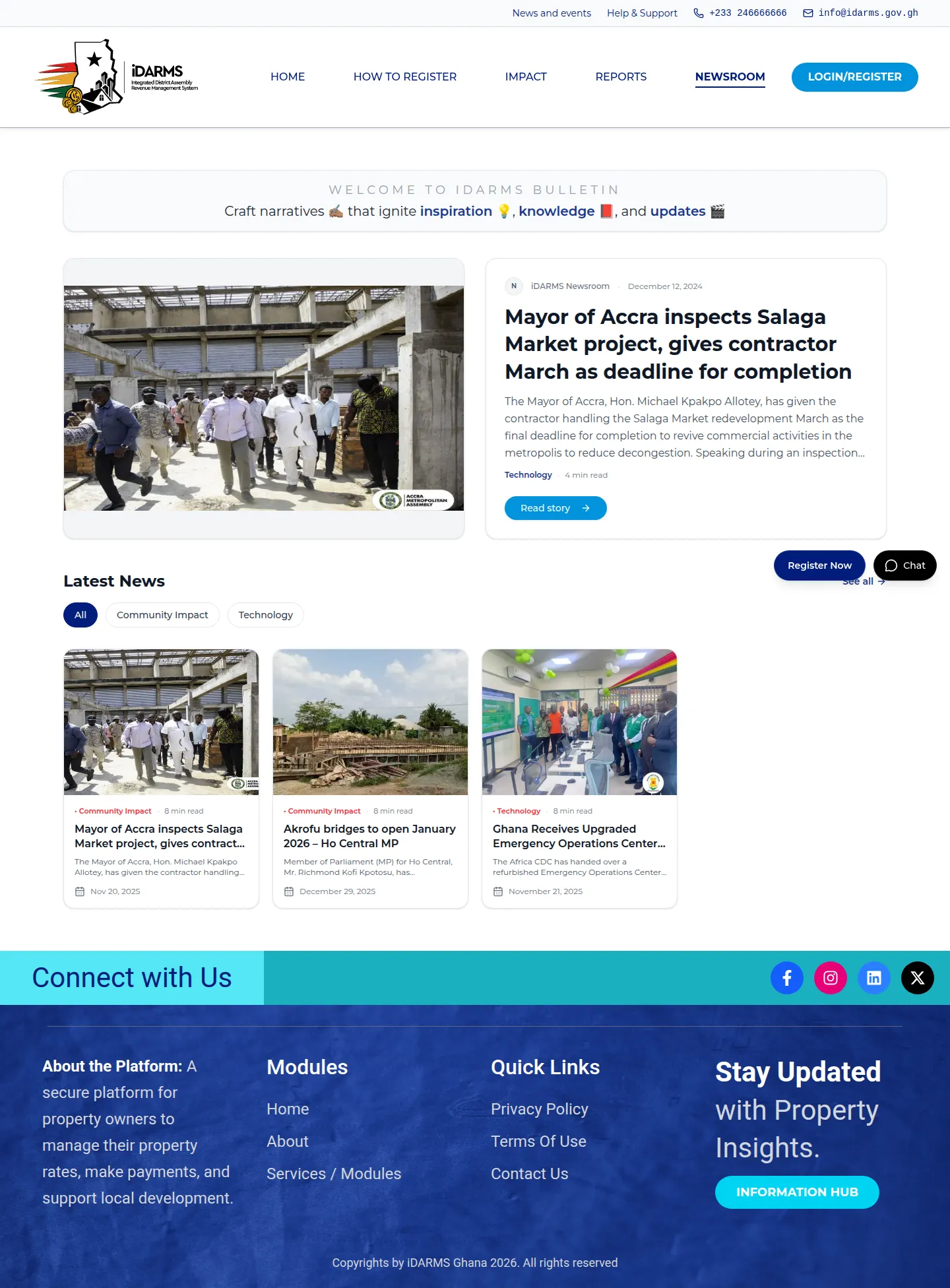
/Newsroom) — featured bulletin split, filter pills, and latest-news card grid. - About (
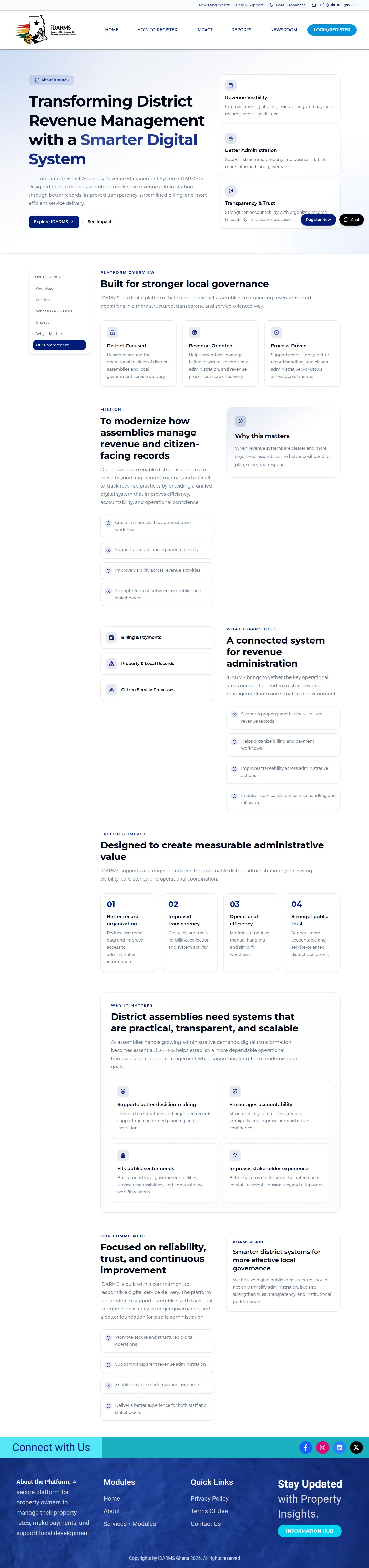
/About) — product hero, sticky on-page nav (when present), and feature/card grids. - Contact Us (
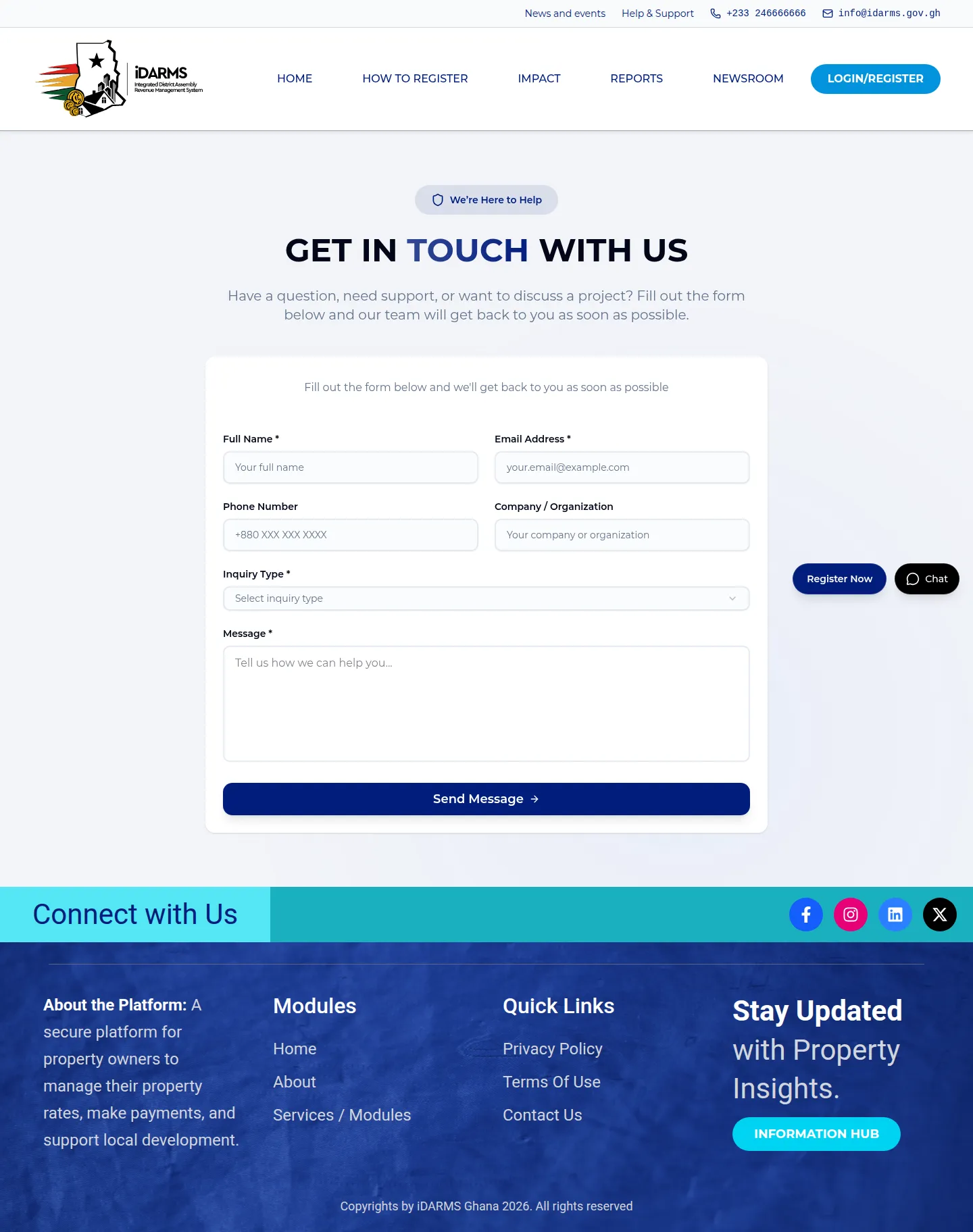
/Contact_us) — centered heading and elevated contact form card. - Services / Modules (
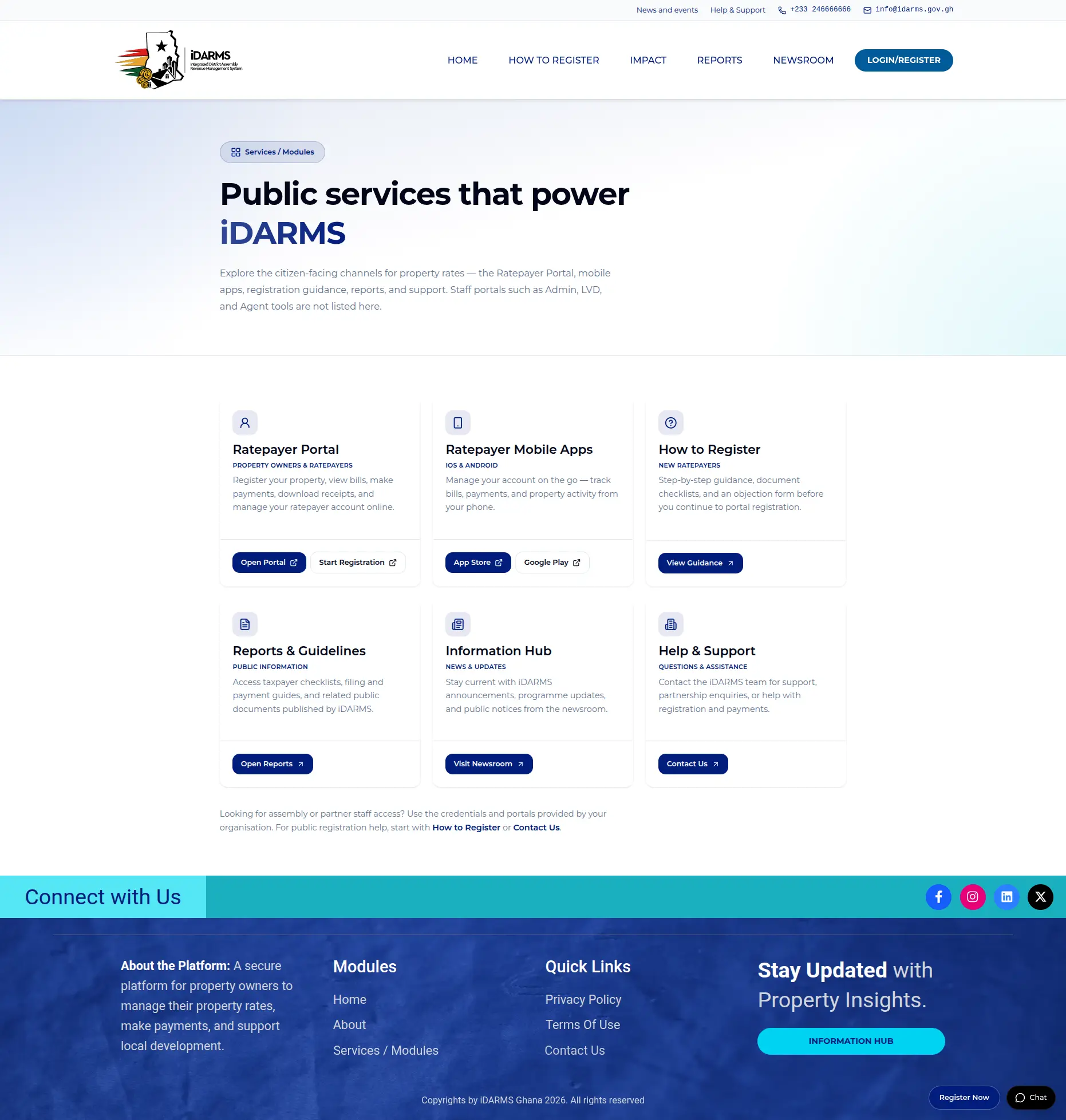
/Services) — public citizen gateway cards for Ratepayer Portal, apps, guidance, reports, newsroom, and support (staff portals not listed).
Detailed form validation and portal registration field tests live in Forms and Auth Handoffs and Ratepayer Portal Authentication.
Coverage summary
| Test ID | Feature | Scenario | Priority |
|---|---|---|---|
| WEB-01 | Core pages | Home full-page layout | Critical |
| WEB-02 | Core pages | How to Register full-page layout | Critical |
| WEB-03 | Core pages | Impact full-page layout | Critical |
| WEB-04 | Core pages | Reports full-page layout | Critical |
| WEB-05 | Core pages | Newsroom full-page layout | High |
| WEB-06 | Core pages | About full-page layout | High |
| WEB-07 | Core pages | Contact Us full-page layout | High |
| WEB-23 | Core pages | Services / Modules full-page layout | High |
Implementation observations requiring UAT confirmation
| Observation from implementation | Required validation |
|---|---|
Contact and Objection POST /api/contact (sandbox proxy) with success/error UI; phone (and objection Property ID) are required. |
Retest under WEB-10 / WEB-11; do not PASS ops inbox receipt without CS confirmation. |
Phone uses NumberInput (type="number") while validation allows optional + in E.164-style regex. |
Use digit-only phone fixture (WEB-FORM-02); blank phone must error. |
| Track Now and Login to Access cards on How to Register are not wired in the current build. | Confirm whether destinations are in cycle scope (WEB-FORM-04). |
Header LOGIN/REGISTER opens the Ratepayer Portal root, not /auth/register. |
Confirm login entry via portal root is approved; registration path is Start Registration → /auth/register (WEB-FORM-05). |
| About and Services are not in the uppercase main nav; Privacy/Terms are footer-only; FAQ chat is global after hero scroll. | Confirm inventory in index; sticky About nav is present in code. |
Footer Services / Modules resolves to /Services (public channels only). |
Capture WEB-23 full-page proof; confirm portal/app CTAs open approved destinations. |
WEB-01 — Home full-page layout
Feature overview
Home is the primary marketing landing page. At desktop 1440×900 it presents the dual header, hero with cyan keyword highlights and Register Now!!!, stats, about/key-values bands, guiding pillars, testimonials, partners toggle, teal app band, value proposition, FAQ, and navy footer.
Preconditions
- Approved website build/URL available.
- Desktop Chrome at 1440×900, device scale 1.
| Field | Value |
|---|---|
| Priority | Critical |
| Test action | Open / at 1440×900. Confirm dual header, hero, stats/about/key-values, pillars, testimonials, partners, teal band, value proposition, FAQ, and footer. Capture full-page evidence. |
| Expected result | Layout matches the baseline band structure and brand tokens; no missing hero media, broken cards, or footer collapse. |
| Execution result | PASS |
| Evidence reference | assets/Website/page-load/home_desktop-full.webp |
| Defect reference | None |
Test scenarios
| Scenario | Test steps | Expected result | Pass/Fail | Remarks |
|---|---|---|---|---|
| Full-page baseline match | 1. Open / at 1440×900.2. Scroll the full page. 3. Compare to the baseline image. |
Dual header, hero with cyan highlights and Register Now!!!, stats/about/key-values, pillars, testimonials, partners, teal app band, value proposition, FAQ, and navy footer match the approved hierarchy. |
PASS |
Evidence: assets/Website/page-load/home_desktop-full.webp |
| Hero and CTA visibility | 1. Inspect the first viewport without scrolling. | Hero media loads; keyword highlights are cyan; primary CTA is visible and not clipped. | PASS |
Register Now CTA visible in first viewport. |
| Band structure integrity | 1. Scroll through stats → about/key-values → pillars → testimonials → partners → app band → value proposition → FAQ → footer. | No missing sections, broken cards, or footer collapse. | PASS |
All bands present; footer intact. |
Cycle proof (single full-page screenshot)
Tester notes
Manual cycle 2026-08-03. Desktop Chrome ~1440×900. Full-page Home evidence logged at assets/Website/page-load/home_desktop-full.webp. Hierarchy and band integrity confirmed — PASS.
WEB-02 — How to Register full-page layout
Feature overview
How to Register guides citizens through registration. The page includes a hero, empowering cards (Start Registration, Track Now, Login to Access), document/calculator sections (or approved placeholders), an objection form card, and the shared footer. Start Registration hands off to the Ratepayer Portal registration URL.
Preconditions
- Approved website build/URL available.
- Desktop Chrome at 1440×900.
- Ability to open a new browser tab for the portal handoff check.
| Field | Value |
|---|---|
| Priority | Critical |
| Test action | Open /HowtoRegister. Confirm layout hierarchy and that Start Registration opens the portal registration URL in a new tab. Capture full-page evidence. |
| Expected result | Page matches baseline hierarchy; form card remains labelled and usable. Start Registration targets https://ratepayer.idarms.cisstaging.com/auth/register (target="_blank", rel="noreferrer"). |
| Execution result | PASS |
| Evidence reference | assets/Website/page-load/howto-register_desktop-full.webp |
| Defect reference | None |
Test scenarios
| Scenario | Test steps | Expected result | Pass/Fail | Remarks |
|---|---|---|---|---|
| Full-page baseline match | 1. Open /HowtoRegister at 1440×900.2. Scroll the full page. 3. Compare to the baseline. |
Hero, empowering cards, document/calculator sections (or placeholders), objection form card, and footer match the approved hierarchy. | PASS |
Evidence: assets/Website/page-load/howto-register_desktop-full.webp |
| Start Registration handoff | 1. Click Start Registration. 2. Inspect the new tab URL and link attributes. |
New tab opens https://ratepayer.idarms.cisstaging.com/auth/register with target="_blank" and rel="noreferrer"; HowtoRegister remains open. |
PASS |
Confirmed URL https://ratepayer.idarms.cisstaging.com/auth/register. Full handoff case: WEB-09A. |
| Objection form card present | 1. Locate the difficulties / objection form card. | Form card is labelled and fields are visible (validation covered in WEB-11). | PASS |
Difficulties / objection form card visible on full-page capture. |
Cycle proof (single full-page screenshot)
Tester notes
Manual cycle 2026-08-03. Desktop Chrome. Full-page HowtoRegister evidence: assets/Website/page-load/howto-register_desktop-full.webp. Start Registration → https://ratepayer.idarms.cisstaging.com/auth/register (new tab) — PASS.
WEB-03 — Impact full-page layout
Feature overview
Impact communicates how rates contribute to public works. The desktop page includes a construction hero with cyan keyword highlights, a contribution section, and the “Where your money goes” donut with 2×2 legend cards.
Preconditions
- Approved website build/URL available.
- Desktop Chrome at 1440×900.
| Field | Value |
|---|---|
| Priority | Critical |
| Test action | Open /Impact. Confirm hero, contribution section, donut chart, and legend cards. Capture full-page evidence. |
| Expected result | Donut and legend percentages remain aligned and readable; hero contrast meets the visual standard. |
| Execution result | PASS |
| Evidence reference | assets/Website/page-load/impact_desktop-full.webp |
| Defect reference | None |
Test scenarios
| Scenario | Test steps | Expected result | Pass/Fail | Remarks |
|---|---|---|---|---|
| Full-page baseline match | 1. Open /Impact at 1440×900.2. Scroll the full page. 3. Compare to the baseline. |
Construction hero with cyan highlights, contribution section, donut, and legend cards match the approved hierarchy. | PASS |
Evidence: assets/Website/page-load/impact_desktop-full.webp |
| Donut and legend alignment | 1. Inspect the “Where your money goes” section. | Donut and 2×2 legend percentages are aligned and readable. | PASS |
Cycle proof (single full-page screenshot)
Tester notes
Manual cycle 2026-08-03. Desktop Chrome. Impact full-page layout and donut/legend readability confirmed — PASS.
WEB-04 — Reports full-page layout
Feature overview
Reports presents downloadable guidance in a two-column desktop layout: left sidebar links (Forms, Acts, Practice Notes and Guidelines) with a help box, and a right-side accordion list. The active REPORTS nav underline should be present.
Preconditions
- Approved website build/URL available.
- Desktop Chrome at 1440×900.
| Field | Value |
|---|---|
| Priority | Critical |
| Test action | Open /Reports. Confirm hero, sidebar, help box, and accordion list. Capture full-page evidence. |
| Expected result | Two-column body remains intact at desktop width; active REPORTS nav underline is present. |
| Execution result | PASS |
| Evidence reference | assets/Website/page-load/reports_desktop-full.webp |
| Defect reference | None |
Test scenarios
| Scenario | Test steps | Expected result | Pass/Fail | Remarks |
|---|---|---|---|---|
| Full-page baseline match | 1. Open /Reports at 1440×900.2. Scroll the full page. 3. Compare to the baseline. |
Hero, left sidebar links, help box, and right-side accordion list match the approved hierarchy. | PASS |
Evidence: assets/Website/page-load/reports_desktop-full.webp |
| Two-column integrity | 1. Confirm sidebar and accordion columns at 1440×900. | Columns remain intact; content does not collapse into a single stacked column unexpectedly. | PASS |
Active REPORTS underline confirmed. |
Cycle proof (single full-page screenshot)
Tester notes
Manual cycle 2026-08-03. Desktop Chrome. Reports full-page two-column layout and REPORTS active nav confirmed — PASS.
WEB-05 — Newsroom full-page layout
Feature overview
Newsroom presents the featured bulletin split, category filter pills, and a three-column latest-news card grid. The active NEWSROOM nav underline should be present.
Preconditions
- Approved website build/URL available.
- Desktop Chrome at 1440×900.
| Field | Value |
|---|---|
| Priority | High |
| Test action | Open /Newsroom. Confirm bulletin feature, filters, and card grid. Capture full-page evidence. |
| Expected result | Featured story and card grid match baseline rhythm; active NEWSROOM underline is present; images load without card collapse. |
| Execution result | PASS |
| Evidence reference | assets/Website/page-load/newsroom_desktop-full.webp |
| Defect reference | None |
Test scenarios
| Scenario | Test steps | Expected result | Pass/Fail | Remarks |
|---|---|---|---|---|
| Full-page baseline match | 1. Open /Newsroom at 1440×900.2. Scroll the full page. 3. Compare to the baseline. |
Featured bulletin, filter pills, and three-column card grid match the approved rhythm. | PASS |
Active NEWSROOM underline present. |
| Image and card integrity | 1. Inspect featured and grid card images. | Images load without card collapse or broken placeholders. | PASS |
Filter behaviour covered in WEB-13. |
Cycle proof (single full-page screenshot)
Tester notes
Manual cycle 2026-08-10. Newsroom full-page layout opens and functions correctly — PASS.
WEB-06 — About full-page layout
Feature overview
About presents the product story with a hero, sticky “On this page” navigation, feature/card grids, and section navigation. Primary CTA affordances should remain visible.
Preconditions
- Approved website build/URL available.
- Desktop Chrome at 1440×900.
| Field | Value |
|---|---|
| Priority | High |
| Test action | Open /About. Confirm product hero, sticky nav, feature/card grids, and section navigation. Capture full-page evidence. |
| Expected result | Sticky/side navigation tracks sections; card grids keep equal gutters; primary CTA remains visible. |
| Execution result | PASS |
| Evidence reference | assets/Website/page-load/about_desktop-full.webp |
| Defect reference | None |
Test scenarios
| Scenario | Test steps | Expected result | Pass/Fail | Remarks |
|---|---|---|---|---|
| Full-page baseline match | 1. Open /About at 1440×900.2. Scroll the full page. 3. Compare to the baseline. |
Product hero, feature/card grids, and section navigation match the approved hierarchy. | PASS |
|
| Sticky / section navigation | 1. Scroll through About sections. 2. Observe “On this page”. |
Sticky/side navigation tracks the active section; card grids keep equal gutters. | PASS |
Sticky nav present. |
Cycle proof (single full-page screenshot)
Tester notes
Manual cycle 2026-08-10. About full-page layout opens and functions correctly — PASS.
WEB-07 — Contact Us full-page layout
Feature overview
Contact Us presents a centered “Get in touch” heading and an elevated form card with two-column fields, full-width Send Message, and a navy footer transition. Field validation is covered under WEB-10.
Preconditions
- Approved website build/URL available.
- Desktop Chrome at 1440×900.
| Field | Value |
|---|---|
| Priority | High |
| Test action | Open /Contact_us. Confirm heading, form card layout, submit control, and footer transition. Capture full-page evidence. |
| Expected result | Form labels and required markers are visible; floating helpers do not cover the submit control. |
| Execution result | PASS |
| Evidence reference | assets/Website/page-load/contact_desktop-full.webp |
| Defect reference | None |
Test scenarios
| Scenario | Test steps | Expected result | Pass/Fail | Remarks |
|---|---|---|---|---|
| Full-page baseline match | 1. Open /Contact_us at 1440×900.2. Scroll the full page. 3. Compare to the baseline. |
Centered heading, elevated form card, full-width Send Message, and navy footer transition match the approved hierarchy. |
PASS |
Evidence: assets/Website/page-load/contact_desktop-full.webp |
| Form card readability | 1. Inspect labels, required markers, and the submit control. | Labels and required markers are visible; floating helpers do not cover Send Message. | PASS |
Validation scenarios: WEB-10. |
Cycle proof (single full-page screenshot)
Tester notes
Manual cycle 2026-08-03. Desktop Chrome. Full-page Contact Us layout confirmed — PASS.
WEB-23 — Services / Modules full-page layout
Feature overview
Services / Modules is the public citizen gateway linked from the footer. It presents a hero and equal-height service cards for Ratepayer Portal, Ratepayer mobile apps, How to Register, Reports, Information Hub (Newsroom), and Help & Support. Staff portals (Admin, LVD, Agent) are out of scope and must not appear as open CTAs.
Preconditions
- Approved website build/URL available (
/Services). - Desktop Chrome at 1440×900, device scale 1.
- Hide the Next.js N badge before capture.
| Field | Value |
|---|---|
| Priority | High |
| Test action | Open /Services at 1440×900. Confirm hero, service card grid, CTA destinations, and footer. Capture one full-page evidence image. |
| Expected result | Public service cards and CTAs match the approved hierarchy; Ratepayer Portal / register / store links open approved destinations; staff systems are not listed as public CTAs. |
| Execution result | PASS |
| Evidence reference | assets/Website/page-load/services_desktop-full.webp |
| Defect reference | None |
Test scenarios
| Scenario | Test steps | Expected result | Pass/Fail | Remarks |
|---|---|---|---|---|
| Full-page baseline match | 1. Open /Services at 1440×900.2. Scroll the full page. 3. Compare to the baseline. |
Hero (“Services / Modules”), six public service cards, CTAs, and navy footer match the approved hierarchy. | PASS |
Evidence: assets/Website/page-load/services_desktop-full.webp |
| Public channel CTAs | 1. Click Open Portal / Start Registration. 2. Click App Store / Google Play (or note search destinations). 3. Click on-site cards (HowtoRegister, Reports, Newsroom, Contact). |
External portal/store links open in a new tab to approved hosts; on-site links resolve to the correct routes. | PASS |
Staff portals not listed. |
| Footer entry | 1. From Home footer, click Services / Modules. | Navigates to /Services. |
PASS |
Cross-check WEB-14. |
Cycle proof (single full-page screenshot)
Tester notes
Manual cycle 2026-08-10. Full-page Services evidence logged at assets/Website/page-load/services_desktop-full.webp (~1862×1957 WebP). Hero, six public cards, CTAs, and footer confirmed — PASS.